Extract frames from video, re-edit GIFs, batch-process images, auto-dedupe, preserve semi-transparent effects, and export transparent image sequences, sprite sheets, GIFs, or MP4 at any resolution — all in one place.
Try it Free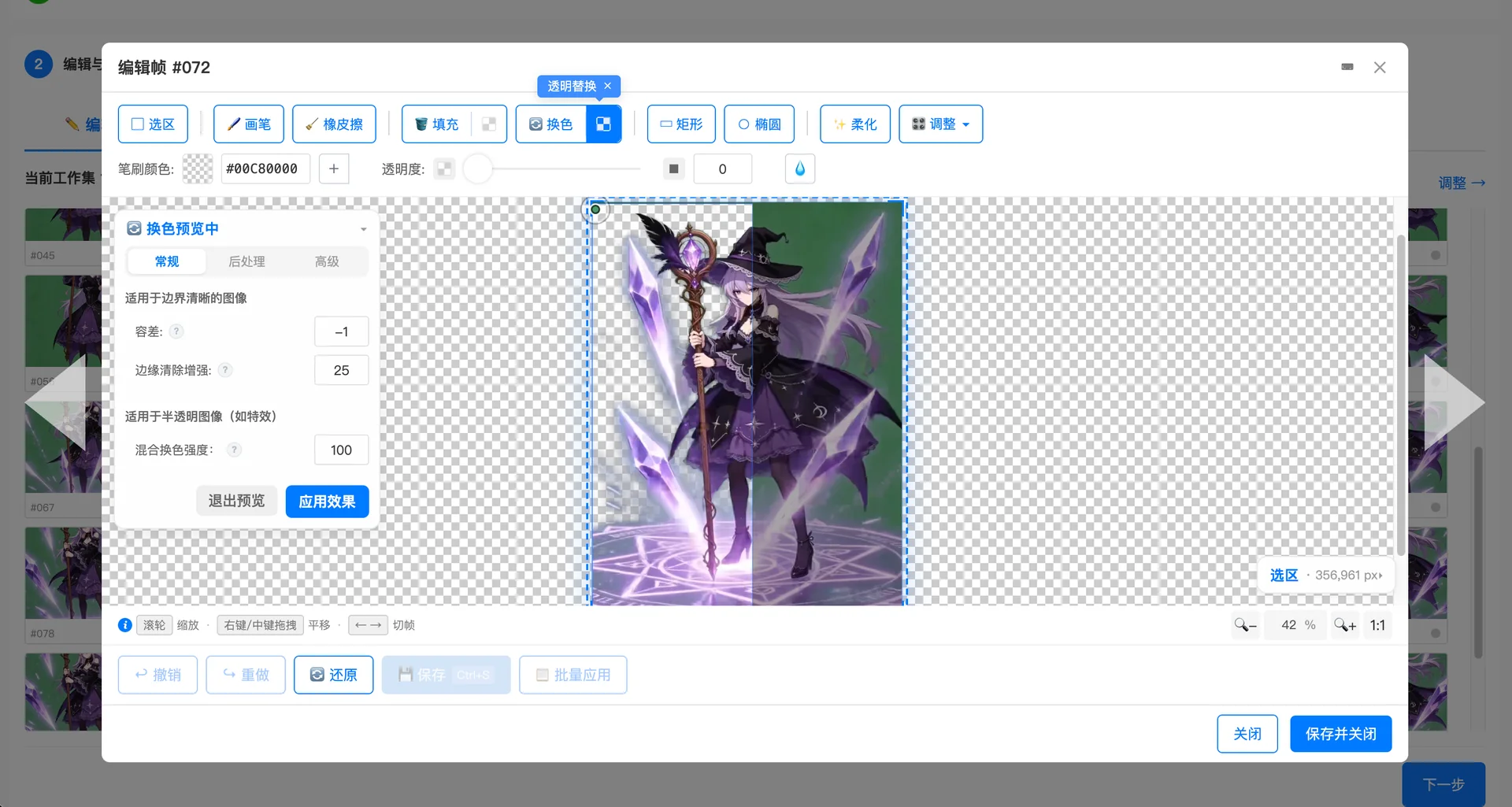
Pick your range and frame rate. Extract frames from any video or GIF in one click.
A pro-grade image editor. Batch background removal, per-frame retouch, one-click jump & duplicate detection — all built in.
GIF, PNG sequence, Sprite Sheet, or MP4 — any resolution. Pixel-perfect, fully under your control.
Runs entirely in your browser. Nothing to install. Everything in one spot. Videos are never stored on any server — your privacy comes first.
Drop in a video, set the frame rate and range, extract frames in one click
One-click background removal, batch apply, fine-tune every frame, and auto-dedupe.
Export as GIF, PNG sequence, sprite sheet, or MP4 — pick your resolution and download
Convert video to GIF with custom frame rate and loop settings. Great for sharing, demos, and social media.
Export as sequentially numbered PNG images. Ideal for game development, animation, and frame-by-frame analysis.
Combine frames into sprite sheets for Unity, Godot, Cocos, and other engines. Custom frames per row and resolution.
Export as MP4 video for previews, social media, and sharing. Custom resolution and frame rate.
Extract character animations, spell effects, and UI effects from AI-generated or reference videos — preserving semi-transparent transitions. Export sprite sheets directly for your game engine.
Extract frames for animation reference and keyframe analysis. Convert videos to GIFs for product demos and tutorials.
Create GIF stickers and social media animations from video clips. Free, no watermark.
Extract frames from AI-generated videos (Runway, Pika, Sora, Kling) and export as animations or sprite sheets.
Capture key frames from instructional videos for presentations and course materials.
Turn pixel art videos into frame animations — edit backgrounds, remove duplicates, export game-ready sprite sheets.
FramePacker is a professional video-to-frame-animation platform that converts videos into image sequences, animated GIFs, sprite sheets, and MP4. It preserves semi-transparent effects like spell FX, fire, and particles, and includes a built-in frame editor with smart deduplication, batch background removal, and custom resolution export — all in your browser with no install required.
With FramePacker it takes three steps: 1. Upload your video, pick a frame rate, and extract frames in one click. 2. Edit and adjust — batch remove backgrounds, fine-tune individual frames, or auto-dedupe. 3. Export as GIF with your preferred frame rate and resolution. Free to try, no install.
Open FramePacker, upload your video, set the frame rate and time range, then click Extract. You can export the frames as PNG sequences at any resolution — perfect for game development, animation, and more.
Yes. FramePacker combines extracted frames into sprite sheets usable in Unity, Godot, Cocos, and other game engines. You can customize frames per row, resolution, and fit mode on export.
Core features are completely free, including video frame extraction, GIF export, and sprite sheet export. Advanced features can be unlocked with FramePacker Pro.
Absolutely. FramePacker supports frame extraction from any video format — including videos generated by AI tools like Runway, Pika, Sora, and Kling. Upload your AI video, extract the frames, and export as animation or sprite sheet.
Video-to-GIF exports your clip as a single animated GIF — great for sharing and demos. Video-to-frames extracts each frame as an individual PNG — ideal for game development and animation where you need individual frame assets. FramePacker supports both.
Yes. Import any GIF, fine-tune frames one by one, batch-remove backgrounds, adjust frame rate and resolution, then re-export.
Yes. The built-in editor includes background fill and color replacement tools for batch background removal across all frames.
A coincidence of naming. FramePack (by lllyasviel, GitHub 17k⭐) is an AI video generation tool (upstream), while FramePacker is a video frame processing tool (downstream). No official relationship — but their functions naturally complement each other: one generates videos, the other processes exports. It's just a coincidence — they happen to work together.
An image sequence is a series of consecutive frames ordered by time, commonly used in game development and animation. Traditionally, you'd draw each frame manually or export them in professional software — but now you can extract them directly from video. This is especially useful for AI-generated videos (Runway, Pika, Sora, etc.), where a few seconds of footage can yield a full set of animation assets. FramePacker makes video-to-frames dead simple: upload your video, pick a frame rate and range, extract in one click — done.
Animated GIFs are the most universally supported short animation format. FramePacker lets you convert video clips directly to GIFs with custom frame rate, resolution, and loop count. Compared to standalone GIF tools, FramePacker's advantage is its editing pipeline: extract frames first, then fine-tune, remove duplicates, and replace backgrounds before exporting — resulting in higher quality, smaller GIFs.
Frame animation is foundational to 2D game development — whether it's character walk cycles, attack animations, or UI effects, they all need a precise set of image frames. FramePacker is built for this workflow: batch-replace backgrounds (e.g., strip AI video backgrounds), smart-dedupe to reduce asset bloat, then export in game-engine-ready formats. From video to usable animation assets — no bouncing between multiple tools.
Many game effects — spell casts, fire, particles — rely on semi-transparent pixels to blend naturally over a scene. Most video-to-frame tools flatten these to an opaque background, destroying the effect. FramePacker preserves the alpha channel so your transparent image sequences, GIFs, and sprite sheets keep their original semi-transparent look — ready to drop straight into your engine.
A sprite sheet (also called a texture atlas) arranges multiple frames on a single image — a format natively supported by Unity, Godot, Cocos Creator, and other major engines. FramePacker automatically combines extracted frames into sprite sheets, with custom frames-per-row, output resolution, and fit modes. No need for TexturePacker or manual layout — it's all built in.
FramePacker's editor handles standalone images and existing GIFs just as well. Color-pick to remove backgrounds, per-pixel brush retouch, edge softening — edit one frame and batch-apply to all. Whether tweaking an existing GIF or batch-processing a set of images, everything happens in one tool.
Game developers: Extract character animations from reference or AI videos, export sprite sheets for your engine. Animators and designers: Extract keyframes for reference, or convert clips to GIFs for product demos. Content creators: Turn videos into GIF stickers and social media animations — free, no watermark. Educators: Capture key frames from instructional videos for course materials.